import tkinter as tk
from tkinter import ttk, messagebox, filedialog, scrolledtext
import os
import threading
import schedule
import time
from datetime import datetime, date, timedelta
from smb.SMBConnection import SMBConnection
import socket
import json
import sys
import io
import base64
from cryptography.fernet import Fernet
from cryptography.hazmat.primitives import hashes
from cryptography.hazmat.primitives.kdf.pbkdf2 import PBKDF2HMAC
import pystray
from PIL import Image, ImageDraw
import winreg
import atexit
class SMBCopierApp:
def __init__(self, root):
self.root = root
self.root.title("SMB文件复制工具")
self.root.geometry("850x750")
self.root.minsize(800, 600)
# 系统托盘图标
self.tray_icon = None
self.in_background = False
# 存储定时任务
self.scheduled_tasks = []
self.schedule_thread = None
self.running = False
# 上一次执行时间,避免重复执行
self.last_execution_time = None
self.last_execution_day = None
# 配置文件路径
self.config_file = "smb_copier_config.json"
# 密钥文件路径
self.key_file = "smb_copier.key"
# 加密密钥(从文件加载或生成新的)
self.encryption_key = self.load_or_create_key()
# 创建主容器
self.main_container = ttk.PanedWindow(root, orient=tk.VERTICAL)
self.main_container.pack(fill=tk.BOTH, expand=True, padx=5, pady=5)
# 创建上部分(设置面板)
self.settings_frame = ttk.Frame(self.main_container)
self.main_container.add(self.settings_frame, weight=1)
# 创建下部分(日志面板)
self.log_frame = ttk.Frame(self.main_container)
self.main_container.add(self.log_frame, weight=1)
self.setup_settings_ui()
self.setup_log_ui()
self.load_config()
self.start_schedule_thread()
# 设置关闭事件
self.root.protocol("WM_DELETE_WINDOW", self.on_closing)
# 注册退出清理
atexit.register(self.cleanup)
def generate_key(self):
"""生成一个新的加密密钥"""
try:
# 使用用户密码生成密钥
password = "smb_copier_default_password".encode() # 你可以修改这个默认密码
salt = b'smb_copier_salt' # 盐值,用于密钥派生
# 使用PBKDF2派生密钥
kdf = PBKDF2HMAC(
algorithm=hashes.SHA256(),
length=32,
salt=salt,
iterations=100000,
)
key = base64.urlsafe_b64encode(kdf.derive(password))
# 保存密钥到文件
with open(self.key_file, 'wb') as f:
f.write(key)
self.log("已生成新的加密密钥")
return key
except Exception as e:
self.log(f"生成密钥失败: {str(e)}")
# 如果失败,使用一个简单的备用密钥
return base64.urlsafe_b64encode(b'smb-copier-default-key-12345678')
def load_or_create_key(self):
"""加载或创建加密密钥"""
try:
if os.path.exists(self.key_file):
with open(self.key_file, 'rb') as f:
key = f.read()
self.log("已加载现有的加密密钥")
return key
else:
return self.generate_key()
except Exception as e:
self.log(f"加载密钥失败: {str(e)},使用备用密钥")
# 使用一个简单的备用密钥
return base64.urlsafe_b64encode(b'smb-copier-default-key-12345678')
def encrypt_password(self, password):
"""加密密码"""
if not password:
return ""
try:
fernet = Fernet(self.encryption_key)
encrypted = fernet.encrypt(password.encode())
return encrypted.decode('utf-8')
except Exception as e:
self.log(f"密码加密失败: {str(e)}")
return password # 如果加密失败,返回原始密码
def decrypt_password(self, encrypted_password):
"""解密密码"""
if not encrypted_password:
return ""
try:
fernet = Fernet(self.encryption_key)
decrypted = fernet.decrypt(encrypted_password.encode())
return decrypted.decode('utf-8')
except Exception as e:
# 如果解密失败,可能是旧版本的未加密密码
self.log(f"密码解密失败,可能为未加密密码: {str(e)}")
return encrypted_password # 返回原始值(可能是未加密的密码)
def setup_settings_ui(self):
"""设置上部分的界面"""
# 创建滚动框架
self.settings_canvas = tk.Canvas(self.settings_frame, highlightthickness=0)
self.settings_scrollbar = ttk.Scrollbar(self.settings_frame, orient=tk.VERTICAL, command=self.settings_canvas.yview)
self.settings_inner_frame = ttk.Frame(self.settings_canvas)
# 配置滚动
self.settings_canvas.configure(yscrollcommand=self.settings_scrollbar.set)
self.settings_scrollbar.pack(side=tk.RIGHT, fill=tk.Y)
self.settings_canvas.pack(side=tk.LEFT, fill=tk.BOTH, expand=True)
# 将内部框架添加到画布
self.canvas_window = self.settings_canvas.create_window((0, 0), window=self.settings_inner_frame, anchor=tk.NW)
# 绑定事件
self.settings_inner_frame.bind('<Configure>', self.on_settings_frame_configure)
self.settings_canvas.bind('<Configure>', self.on_settings_canvas_configure)
# 使用Notebook选项卡组织内容
self.notebook = ttk.Notebook(self.settings_inner_frame)
self.notebook.pack(fill=tk.BOTH, expand=True, padx=5, pady=5)
# 创建各个选项卡
self.setup_source_tab()
self.setup_target_tab()
self.setup_copy_tab()
self.setup_schedule_tab()
def on_settings_frame_configure(self, event=None):
"""内部框架配置时调整画布滚动区域"""
self.settings_canvas.configure(scrollregion=self.settings_canvas.bbox('all'))
def on_settings_canvas_configure(self, event):
"""画布大小变化时调整内部框架宽度"""
self.settings_canvas.itemconfig(self.canvas_window, width=event.width)
def setup_log_ui(self):
"""设置下部分的日志界面"""
# 日志标题和清除按钮
log_header = ttk.Frame(self.log_frame)
log_header.pack(fill=tk.X, padx=5, pady=(5, 0))
ttk.Label(log_header, text="操作日志", font=('Arial', 10, 'bold')).pack(side=tk.LEFT)
# 添加密钥管理按钮
ttk.Button(log_header, text="重新生成密钥", command=self.regenerate_key, width=12).pack(side=tk.RIGHT, padx=(0, 5))
ttk.Button(log_header, text="清除日志", command=self.clear_log, width=10).pack(side=tk.RIGHT)
# 日志文本框
self.log_text = scrolledtext.ScrolledText(
self.log_frame,
wrap=tk.WORD,
height=12,
font=('Consolas', 9)
)
self.log_text.pack(fill=tk.BOTH, expand=True, padx=5, pady=5)
# 添加初始日志
self.log("SMB文件复制工具已启动")
self.log(f"当前时间: {datetime.now().strftime('%Y-%m-%d %H:%M:%S')}")
def regenerate_key(self):
"""重新生成加密密钥"""
if messagebox.askyesno("确认", "重新生成密钥将导致已保存的加密密码无法解密,确定要继续吗?"):
try:
# 删除旧的密钥文件
if os.path.exists(self.key_file):
os.remove(self.key_file)
self.log("已删除旧的密钥文件")
# 生成新的密钥
self.encryption_key = self.generate_key()
# 清除配置文件中的加密密码
config = {}
if os.path.exists(self.config_file):
with open(self.config_file, 'r', encoding='utf-8') as f:
config = json.load(f)
# 清除加密的密码字段
password_fields = ['source_smb_password', 'target_smb_password']
for field in password_fields:
if field in config:
config[field] = ""
# 保存配置
with open(self.config_file, 'w', encoding='utf-8') as f:
json.dump(config, f, ensure_ascii=False, indent=2)
# 清除界面中的密码
self.source_smb_password.set("")
self.target_smb_password.set("")
self.log("已重新生成加密密钥,请重新输入并保存密码")
messagebox.showinfo("成功", "加密密钥已重新生成,请重新输入并保存密码。")
except Exception as e:
self.log(f"重新生成密钥失败: {str(e)}")
messagebox.showerror("错误", f"重新生成密钥失败: {str(e)}")
def setup_source_tab(self):
"""设置源目录选项卡"""
self.source_tab = ttk.Frame(self.notebook)
self.notebook.add(self.source_tab, text="源目录")
# 源目录类型选择
self.source_type = tk.StringVar(value="local")
type_frame = ttk.LabelFrame(self.source_tab, text="目录类型", padding="10")
type_frame.pack(fill=tk.X, padx=10, pady=(10, 5))
ttk.Radiobutton(type_frame, text="本地目录", variable=self.source_type,
value="local", command=self.toggle_source_type).pack(side=tk.LEFT, padx=(0, 20))
ttk.Radiobutton(type_frame, text="SMB目录", variable=self.source_type,
value="smb", command=self.toggle_source_type).pack(side=tk.LEFT)
# 本地源目录
self.source_local_frame = ttk.LabelFrame(self.source_tab, text="本地目录设置", padding="10")
self.source_local_frame.pack(fill=tk.X, padx=10, pady=5)
ttk.Label(self.source_local_frame, text="目录路径:").grid(row=0, column=0, sticky=tk.W, pady=(0, 5))
self.source_local_path = tk.StringVar()
source_entry = ttk.Entry(self.source_local_frame, textvariable=self.source_local_path)
source_entry.grid(row=0, column=1, sticky=tk.EW, padx=(5, 5), pady=(0, 5))
ttk.Button(self.source_local_frame, text="浏览", command=self.browse_source_local,
width=8).grid(row=0, column=2, pady=(0, 5))
# 配置网格权重
self.source_local_frame.columnconfigure(1, weight=1)
# SMB源目录设置
self.source_smb_frame = ttk.LabelFrame(self.source_tab, text="SMB目录设置", padding="10")
self.source_smb_frame.pack(fill=tk.X, padx=10, pady=5)
# SMB路径
ttk.Label(self.source_smb_frame, text="SMB路径:").grid(row=0, column=0, sticky=tk.W, pady=(0, 5))
self.source_smb_path = tk.StringVar()
smb_entry = ttk.Entry(self.source_smb_frame, textvariable=self.source_smb_path)
smb_entry.grid(row=0, column=1, sticky=tk.EW, padx=(5, 5), pady=(0, 5))
# 用户名和密码
ttk.Label(self.source_smb_frame, text="用户名:").grid(row=1, column=0, sticky=tk.W, pady=(0, 5))
self.source_smb_username = tk.StringVar()
ttk.Entry(self.source_smb_frame, textvariable=self.source_smb_username, width=20).grid(row=1, column=1, sticky=tk.W, padx=(5, 5), pady=(0, 5))
ttk.Label(self.source_smb_frame, text="密码:").grid(row=1, column=2, sticky=tk.W, pady=(0, 5))
self.source_smb_password = tk.StringVar()
ttk.Entry(self.source_smb_frame, textvariable=self.source_smb_password,
show="*", width=20).grid(row=1, column=3, sticky=tk.W, padx=(5, 0), pady=(0, 5))
# 显示密码复选框
self.show_source_password = tk.BooleanVar(value=False)
ttk.Checkbutton(self.source_smb_frame, text="显示密码",
variable=self.show_source_password,
command=self.toggle_source_password_visibility).grid(row=2, column=3, sticky=tk.W, pady=(0, 5))
# 测试连接按钮
ttk.Button(self.source_smb_frame, text="测试连接",
command=self.test_source_smb_connection).grid(row=2, column=0, columnspan=2, sticky=tk.W, pady=(0, 5))
# 示例标签
example_frame = ttk.Frame(self.source_smb_frame)
example_frame.grid(row=3, column=0, columnspan=4, sticky=tk.W, pady=(5, 0))
ttk.Label(example_frame, text="示例格式: \\\\192.168.1.1\\share\\目录",
foreground="gray", font=('Arial', 8)).pack(side=tk.LEFT)
# 配置网格权重
self.source_smb_frame.columnconfigure(1, weight=1)
# 初始化UI状态
self.toggle_source_type()
def toggle_source_password_visibility(self):
"""切换源密码显示状态"""
if self.show_source_password.get():
self.source_smb_frame.winfo_children()[6].config(show="") # 密码输入框
else:
self.source_smb_frame.winfo_children()[6].config(show="*")
def toggle_target_password_visibility(self):
"""切换目标密码显示状态"""
if self.show_target_password.get():
self.target_smb_frame.winfo_children()[6].config(show="") # 密码输入框
else:
self.target_smb_frame.winfo_children()[6].config(show="*")
def setup_target_tab(self):
"""设置目标目录选项卡"""
self.target_tab = ttk.Frame(self.notebook)
self.notebook.add(self.target_tab, text="目标目录")
# 目标目录类型选择
self.target_type = tk.StringVar(value="local")
type_frame = ttk.LabelFrame(self.target_tab, text="目录类型", padding="10")
type_frame.pack(fill=tk.X, padx=10, pady=(10, 5))
ttk.Radiobutton(type_frame, text="本地目录", variable=self.target_type,
value="local", command=self.toggle_target_type).pack(side=tk.LEFT, padx=(0, 20))
ttk.Radiobutton(type_frame, text="SMB目录", variable=self.target_type,
value="smb", command=self.toggle_target_type).pack(side=tk.LEFT)
# 本地目标目录
self.target_local_frame = ttk.LabelFrame(self.target_tab, text="本地目录设置", padding="10")
self.target_local_frame.pack(fill=tk.X, padx=10, pady=5)
ttk.Label(self.target_local_frame, text="目录路径:").grid(row=0, column=0, sticky=tk.W, pady=(0, 5))
self.target_local_path = tk.StringVar()
target_entry = ttk.Entry(self.target_local_frame, textvariable=self.target_local_path)
target_entry.grid(row=0, column=1, sticky=tk.EW, padx=(5, 5), pady=(0, 5))
ttk.Button(self.target_local_frame, text="浏览", command=self.browse_target_local,
width=8).grid(row=0, column=2, pady=(0, 5))
# 配置网格权重
self.target_local_frame.columnconfigure(1, weight=1)
# SMB目标目录设置
self.target_smb_frame = ttk.LabelFrame(self.target_tab, text="SMB目录设置", padding="10")
self.target_smb_frame.pack(fill=tk.X, padx=10, pady=5)
# SMB路径
ttk.Label(self.target_smb_frame, text="SMB路径:").grid(row=0, column=0, sticky=tk.W, pady=(0, 5))
self.target_smb_path = tk.StringVar()
target_smb_entry = ttk.Entry(self.target_smb_frame, textvariable=self.target_smb_path)
target_smb_entry.grid(row=0, column=1, sticky=tk.EW, padx=(5, 5), pady=(0, 5))
# 用户名和密码
ttk.Label(self.target_smb_frame, text="用户名:").grid(row=1, column=0, sticky=tk.W, pady=(0, 5))
self.target_smb_username = tk.StringVar()
ttk.Entry(self.target_smb_frame, textvariable=self.target_smb_username, width=20).grid(row=1, column=1, sticky=tk.W, padx=(5, 5), pady=(0, 5))
ttk.Label(self.target_smb_frame, text="密码:").grid(row=1, column=2, sticky=tk.W, pady=(0, 5))
self.target_smb_password = tk.StringVar()
ttk.Entry(self.target_smb_frame, textvariable=self.target_smb_password,
show="*", width=20).grid(row=1, column=3, sticky=tk.W, padx=(5, 0), pady=(0, 5))
# 显示密码复选框
self.show_target_password = tk.BooleanVar(value=False)
ttk.Checkbutton(self.target_smb_frame, text="显示密码",
variable=self.show_target_password,
command=self.toggle_target_password_visibility).grid(row=2, column=3, sticky=tk.W, pady=(0, 5))
# 测试连接按钮
ttk.Button(self.target_smb_frame, text="测试连接",
command=self.test_target_smb_connection).grid(row=2, column=0, columnspan=2, sticky=tk.W, pady=(0, 5))
# 示例标签
example_frame = ttk.Frame(self.target_smb_frame)
example_frame.grid(row=3, column=0, columnspan=4, sticky=tk.W, pady=(5, 0))
ttk.Label(example_frame, text="示例格式: \\\\192.168.1.1\\share\\目录",
foreground="gray", font=('Arial', 8)).pack(side=tk.LEFT)
# 配置网格权重
self.target_smb_frame.columnconfigure(1, weight=1)
# 初始化UI状态
self.toggle_target_type()
def toggle_source_type(self):
"""切换源目录类型"""
if self.source_type.get() == "local":
self.source_smb_frame.pack_forget()
self.source_local_frame.pack(fill=tk.X, padx=10, pady=5)
else:
self.source_local_frame.pack_forget()
self.source_smb_frame.pack(fill=tk.X, padx=10, pady=5)
def toggle_target_type(self):
"""切换目标目录类型"""
if self.target_type.get() == "local":
self.target_smb_frame.pack_forget()
self.target_local_frame.pack(fill=tk.X, padx=10, pady=5)
else:
self.target_local_frame.pack_forget()
self.target_smb_frame.pack(fill=tk.X, padx=10, pady=5)
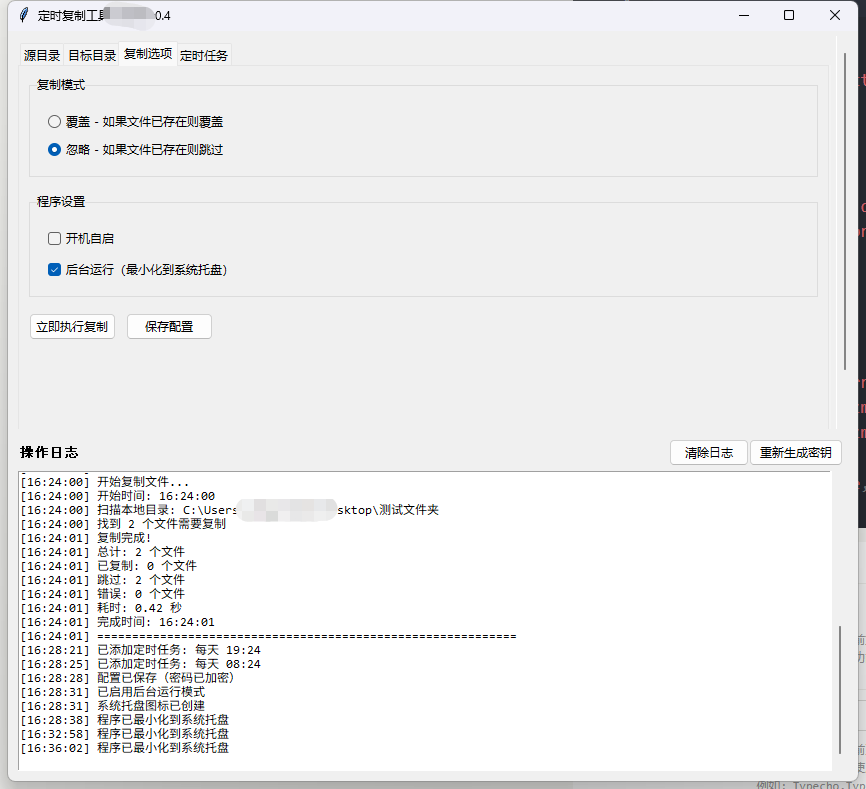
def setup_copy_tab(self):
"""设置复制选项选项卡"""
self.copy_tab = ttk.Frame(self.notebook)
self.notebook.add(self.copy_tab, text="复制选项")
# 复制模式
copy_frame = ttk.LabelFrame(self.copy_tab, text="复制模式", padding="15")
copy_frame.pack(fill=tk.X, padx=10, pady=(10, 15))
self.copy_mode = tk.StringVar(value="overwrite")
ttk.Radiobutton(copy_frame, text="覆盖 - 如果文件已存在则覆盖",
variable=self.copy_mode, value="overwrite").pack(anchor=tk.W, pady=(0, 5))
ttk.Radiobutton(copy_frame, text="忽略 - 如果文件已存在则跳过",
variable=self.copy_mode, value="skip").pack(anchor=tk.W)
# 开机自启选项
auto_start_frame = ttk.LabelFrame(self.copy_tab, text="程序设置", padding="15")
auto_start_frame.pack(fill=tk.X, padx=10, pady=(0, 15))
# 开机自启
self.auto_start = tk.BooleanVar(value=False)
auto_start_check = ttk.Checkbutton(auto_start_frame, text="开机自启",
variable=self.auto_start,
command=self.toggle_auto_start)
auto_start_check.pack(anchor=tk.W, pady=(0, 8))
# 后台运行
self.background_mode = tk.BooleanVar(value=False)
background_check = ttk.Checkbutton(auto_start_frame, text="后台运行(最小化到系统托盘)",
variable=self.background_mode,
command=self.toggle_background_mode)
background_check.pack(anchor=tk.W)
# 立即复制按钮
btn_frame = ttk.Frame(self.copy_tab)
btn_frame.pack(fill=tk.X, padx=10, pady=(0, 10))
ttk.Button(btn_frame, text="立即执行复制",
command=self.execute_copy_now, style="Accent.TButton").pack(side=tk.LEFT, padx=(0, 10))
ttk.Button(btn_frame, text="保存配置",
command=self.save_config).pack(side=tk.LEFT)
def toggle_auto_start(self):
"""切换开机自启"""
try:
if self.auto_start.get():
# 设置开机自启
self.set_auto_start(True)
self.log("已启用开机自启")
else:
# 取消开机自启
self.set_auto_start(False)
self.log("已禁用开机自启")
except Exception as e:
self.log(f"设置开机自启失败: {str(e)}")
messagebox.showerror("错误", f"设置开机自启失败: {str(e)}")
def set_auto_start(self, enable=True):
"""设置开机自启"""
try:
# 获取当前可执行文件路径
if getattr(sys, 'frozen', False):
# 如果是打包后的exe
exe_path = sys.executable
else:
# 如果是Python脚本
exe_path = sys.executable
script_path = os.path.abspath(__file__)
exe_path = f'"{exe_path}" "{script_path}"'
if sys.platform == "win32":
# Windows系统 - 使用注册表
key = winreg.HKEY_CURRENT_USER
subkey = r"Software\Microsoft\Windows\CurrentVersion\Run"
try:
with winreg.OpenKey(key, subkey, 0, winreg.KEY_SET_VALUE) as reg_key:
if enable:
winreg.SetValueEx(reg_key, "SMBCopier", 0, winreg.REG_SZ, exe_path)
else:
try:
winreg.DeleteValue(reg_key, "SMBCopier")
except:
pass # 如果键不存在,忽略
except Exception as e:
self.log(f"访问注册表失败: {str(e)}")
else:
# Linux/Mac系统 - 使用启动文件夹
startup_dir = ""
if sys.platform == "darwin":
# Mac
startup_dir = os.path.expanduser("~/Library/LaunchAgents")
else:
# Linux
startup_dir = os.path.expanduser("~/.config/autostart")
if startup_dir:
os.makedirs(startup_dir, exist_ok=True)
desktop_file = os.path.join(startup_dir, "smb_copier.desktop")
if enable:
desktop_content = f"""[Desktop Entry]
Type=Application
Name=SMB Copier
Exec={exe_path}
Hidden=false
X-GNOME-Autostart-enabled=true
"""
with open(desktop_file, "w") as f:
f.write(desktop_content)
else:
if os.path.exists(desktop_file):
os.remove(desktop_file)
except Exception as e:
raise Exception(f"设置开机自启失败: {str(e)}")
def toggle_background_mode(self):
"""切换后台运行模式"""
if self.background_mode.get():
self.log("已启用后台运行模式")
if not self.tray_icon:
self.create_tray_icon()
else:
self.log("已禁用后台运行模式")
# 如果正在后台运行,则恢复窗口
if self.in_background:
self.restore_from_tray()
def create_tray_icon(self):
"""创建系统托盘图标"""
try:
# 创建图标
image = Image.new('RGB', (64, 64), color='white')
draw = ImageDraw.Draw(image)
# 绘制一个简单的图标
draw.rectangle([16, 16, 48, 48], outline='blue', width=3)
draw.line([20, 20, 44, 44], fill='green', width=3)
draw.line([20, 44, 44, 20], fill='red', width=3)
# 创建菜单
menu = (
pystray.MenuItem("显示窗口", self.restore_from_tray),
pystray.MenuItem("立即复制", self.execute_copy_now),
pystray.MenuItem("退出", self.quit_from_tray)
)
# 创建托盘图标
self.tray_icon = pystray.Icon("smb_copier", image, "SMB文件复制工具", menu)
# 启动托盘图标线程
threading.Thread(target=self.tray_icon.run, daemon=True).start()
self.log("系统托盘图标已创建")
except Exception as e:
self.log(f"创建系统托盘图标失败: {str(e)}")
messagebox.showwarning("警告", f"创建系统托盘图标失败: {str(e)}\n请确保已安装PIL和pystray库。")
def restore_from_tray(self):
"""从托盘恢复窗口"""
if self.tray_icon:
self.root.after(0, self._show_window)
def _show_window(self):
"""显示窗口"""
self.root.deiconify() # 显示窗口
self.root.lift() # 置于顶层
self.root.focus_force() # 获取焦点
self.in_background = False
def quit_from_tray(self):
"""从托盘退出程序"""
if self.tray_icon:
self.tray_icon.stop()
self.root.after(0, self.root.quit)
def minimize_to_tray(self):
"""最小化到系统托盘"""
if self.tray_icon:
self.root.withdraw() # 隐藏窗口
self.in_background = True
self.log("程序已最小化到系统托盘")
def browse_source_local(self):
"""浏览本地源目录"""
path = filedialog.askdirectory(title="选择源目录")
if path:
self.source_local_path.set(path)
self.log(f"源目录设置为: {path}")
def browse_target_local(self):
"""浏览本地目标目录"""
path = filedialog.askdirectory(title="选择目标目录")
if path:
self.target_local_path.set(path)
self.log(f"目标目录设置为: {path}")
def parse_smb_path(self, smb_path):
"""解析SMB路径"""
if not smb_path:
return None, None, None
# 统一替换为斜杠
smb_path = smb_path.replace('\\', '/')
# 移除开头的双斜杠或双反斜杠
if smb_path.startswith('//'):
smb_path = smb_path[2:]
# 分割路径
parts = smb_path.split('/', 2)
if len(parts) < 2:
return None, None, None
server = parts[0]
share = parts[1]
path = parts[2] if len(parts) > 2 else ''
# 确保路径以/开头
if path and not path.startswith('/'):
path = '/' + path
return server, share, path
def test_source_smb_connection(self):
"""测试源SMB连接"""
smb_path = self.source_smb_path.get()
if not smb_path:
messagebox.showwarning("警告", "请输入SMB路径")
return
server, share, path = self.parse_smb_path(smb_path)
if not server or not share:
messagebox.showwarning("警告", "SMB路径格式不正确,请参考示例格式")
return
username = self.source_smb_username.get()
password = self.source_smb_password.get()
self.test_smb_connection(server, share, username, password, "源")
def test_target_smb_connection(self):
"""测试目标SMB连接"""
smb_path = self.target_smb_path.get()
if not smb_path:
messagebox.showwarning("警告", "请输入SMB路径")
return
server, share, path = self.parse_smb_path(smb_path)
if not server or not share:
messagebox.showwarning("警告", "SMB路径格式不正确,请参考示例格式")
return
username = self.target_smb_username.get()
password = self.target_smb_password.get()
self.test_smb_connection(server, share, username, password, "目标")
def test_smb_connection(self, server, share, username, password, label):
"""测试SMB连接"""
try:
self.log(f"正在测试{label}SMB连接: {server}/{share}")
# 创建SMB连接
conn = SMBConnection(
username if username else '',
password if password else '',
socket.gethostname(),
server,
domain='',
use_ntlm_v2=True
)
# 尝试连接
connected = conn.connect(server, 139)
if connected:
# 尝试列出共享内容
try:
conn.listPath(share, '/')
self.log(f"✓ {label}SMB连接测试成功")
messagebox.showinfo("成功", f"{label}SMB连接测试成功!")
except Exception as e:
error_msg = f"无法访问共享目录: {str(e)}"
self.log(f"✗ {error_msg}")
messagebox.showerror("错误", error_msg)
finally:
conn.close()
else:
error_msg = f"无法连接到{label}SMB服务器"
self.log(f"✗ {error_msg}")
messagebox.showerror("错误", error_msg)
except Exception as e:
error_msg = f"{label}SMB连接测试失败: {str(e)}"
self.log(f"✗ {error_msg}")
messagebox.showerror("错误", error_msg)
def setup_schedule_tab(self):
"""设置定时任务选项卡"""
self.schedule_tab = ttk.Frame(self.notebook)
self.notebook.add(self.schedule_tab, text="定时任务")
# 启用定时任务
schedule_frame = ttk.LabelFrame(self.schedule_tab, text="定时设置", padding="15")
schedule_frame.pack(fill=tk.BOTH, expand=True, padx=10, pady=10)
self.enable_schedule = tk.BooleanVar(value=False)
ttk.Checkbutton(schedule_frame, text="启用定时任务",
variable=self.enable_schedule).pack(anchor=tk.W, pady=(0, 15))
# 频率和时间设置
settings_frame = ttk.Frame(schedule_frame)
settings_frame.pack(fill=tk.X, pady=(0, 15))
# 频率选择
freq_frame = ttk.Frame(settings_frame)
freq_frame.pack(side=tk.LEFT, fill=tk.Y, padx=(0, 20))
ttk.Label(freq_frame, text="频率:").pack(anchor=tk.W)
self.schedule_freq = tk.StringVar(value="每天")
freq_combo = ttk.Combobox(freq_frame, textvariable=self.schedule_freq,
values=["每天", "每周"], width=10, state="readonly")
freq_combo.pack(anchor=tk.W, pady=(5, 0))
# 每周选择
self.weekday_frame = ttk.Frame(freq_frame)
self.weekday_frame.pack(anchor=tk.W, pady=(5, 0))
ttk.Label(self.weekday_frame, text="星期:").pack(side=tk.LEFT)
self.weekday = tk.StringVar(value="星期一")
weekday_combo = ttk.Combobox(self.weekday_frame, textvariable=self.weekday,
values=["星期一", "星期二", "星期三", "星期四", "星期五", "星期六", "星期日"],
width=10, state="readonly")
weekday_combo.pack(side=tk.LEFT, padx=(5, 0))
self.weekday_frame.pack_forget() # 默认隐藏
# 时间选择
time_frame = ttk.Frame(settings_frame)
time_frame.pack(side=tk.LEFT, fill=tk.Y)
ttk.Label(time_frame, text="时间:").pack(anchor=tk.W)
time_input_frame = ttk.Frame(time_frame)
time_input_frame.pack(anchor=tk.W, pady=(5, 0))
self.schedule_hour = tk.StringVar(value="00")
hour_combo = ttk.Combobox(time_input_frame, textvariable=self.schedule_hour,
values=[f"{i:02d}" for i in range(24)], width=5, state="readonly")
hour_combo.pack(side=tk.LEFT)
ttk.Label(time_input_frame, text=":").pack(side=tk.LEFT, padx=(2, 2))
self.schedule_minute = tk.StringVar(value="00")
minute_combo = ttk.Combobox(time_input_frame, textvariable=self.schedule_minute,
values=[f"{i:02d}" for i in range(60)], width=5, state="readonly")
minute_combo.pack(side=tk.LEFT)
# 绑定频率变化事件
freq_combo.bind('<<ComboboxSelected>>', self.on_freq_change)
# 添加定时任务按钮
ttk.Button(schedule_frame, text="添加定时任务",
command=self.add_schedule_task).pack(anchor=tk.W, pady=(0, 15))
# 定时任务列表
list_frame = ttk.Frame(schedule_frame)
list_frame.pack(fill=tk.BOTH, expand=True, pady=(0, 15))
# 创建滚动条
list_scrollbar = ttk.Scrollbar(list_frame)
list_scrollbar.pack(side=tk.RIGHT, fill=tk.Y)
# 创建列表框
self.task_listbox = tk.Listbox(list_frame, height=8, yscrollcommand=list_scrollbar.set)
self.task_listbox.pack(side=tk.LEFT, fill=tk.BOTH, expand=True)
list_scrollbar.config(command=self.task_listbox.yview)
# 删除任务按钮
ttk.Button(schedule_frame, text="删除选中任务",
command=self.delete_selected_task).pack(anchor=tk.W, pady=(0, 5))
def on_freq_change(self, event=None):
"""频率选择变化"""
if self.schedule_freq.get() == "每周":
self.weekday_frame.pack(anchor=tk.W, pady=(5, 0))
else:
self.weekday_frame.pack_forget()
def add_schedule_task(self):
"""添加定时任务"""
if not self.enable_schedule.get():
messagebox.showwarning("警告", "请先启用定时任务")
return
# 获取频率和时间
freq = self.schedule_freq.get()
hour = self.schedule_hour.get()
minute = self.schedule_minute.get()
if freq == "每周":
weekday = self.weekday.get()
weekday_num = ["星期一", "星期二", "星期三", "星期四", "星期五", "星期六", "星期日"].index(weekday)
task_desc = f"每周{weekday} {hour}:{minute}"
task_data = {
'freq': 'weekly',
'weekday': weekday_num,
'hour': int(hour),
'minute': int(minute)
}
else:
task_desc = f"每天 {hour}:{minute}"
task_data = {
'freq': 'daily',
'hour': int(hour),
'minute': int(minute)
}
# 添加到列表
self.task_listbox.insert(tk.END, task_desc)
self.scheduled_tasks.append(task_data)
# 记录日志
self.log(f"已添加定时任务: {task_desc}")
def delete_selected_task(self):
"""删除选中的定时任务"""
selection = self.task_listbox.curselection()
if not selection:
messagebox.showwarning("警告", "请先选择一个任务")
return
index = selection[0]
task_desc = self.task_listbox.get(index)
self.task_listbox.delete(index)
del self.scheduled_tasks[index]
self.log(f"已删除定时任务: {task_desc}")
def execute_copy_now(self):
"""立即执行复制"""
# 在新线程中执行复制,避免界面卡顿
thread = threading.Thread(target=self.copy_files, daemon=True)
thread.start()
def copy_files(self):
"""执行文件复制"""
try:
self.log("=" * 60)
self.log("开始复制文件...")
start_time = datetime.now()
self.log(f"开始时间: {start_time.strftime('%H:%M:%S')}")
# 获取源文件和目标文件列表
source_files = self.get_source_files()
if not source_files:
self.log("警告: 没有找到要复制的文件")
return
self.log(f"找到 {len(source_files)} 个文件需要复制")
# 执行复制
copied = 0
skipped = 0
errors = 0
for i, file_info in enumerate(source_files):
try:
success = self.copy_single_file(file_info)
if success == "copied":
copied += 1
if copied % 10 == 0: # 每10个文件记录一次进度
self.log(f"进度: 已处理 {i+1}/{len(source_files)} 个文件")
elif success == "skipped":
skipped += 1
elif success == "error":
errors += 1
self.log(f"错误: 复制失败 - {file_info.get('rel_path', '未知文件')}")
except Exception as e:
errors += 1
self.log(f"异常: 复制文件时出错 - {str(e)}")
# 完成
end_time = datetime.now()
duration = end_time - start_time
self.log(f"复制完成!")
self.log(f"总计: {len(source_files)} 个文件")
self.log(f"已复制: {copied} 个文件")
self.log(f"跳过: {skipped} 个文件")
self.log(f"错误: {errors} 个文件")
self.log(f"耗时: {duration.total_seconds():.2f} 秒")
self.log(f"完成时间: {end_time.strftime('%H:%M:%S')}")
self.log("=" * 60)
except Exception as e:
self.log(f"严重错误: 复制过程中出现异常 - {str(e)}")
def get_source_files(self):
"""获取源文件列表"""
source_files = []
if self.source_type.get() == "local":
# 本地目录
source_path = self.source_local_path.get()
if not source_path or not os.path.exists(source_path):
self.log(f"错误: 源目录不存在或未设置 - {source_path}")
return []
self.log(f"扫描本地目录: {source_path}")
for root, dirs, files in os.walk(source_path):
for file in files:
full_path = os.path.join(root, file)
rel_path = os.path.relpath(full_path, source_path)
source_files.append({
'type': 'local',
'full_path': full_path,
'rel_path': rel_path
})
else:
# SMB目录
smb_path = self.source_smb_path.get()
if not smb_path:
self.log("错误: SMB源目录未设置")
return []
server, share, base_path = self.parse_smb_path(smb_path)
if not server or not share:
self.log(f"错误: SMB路径格式不正确 - {smb_path}")
return []
try:
self.log(f"连接SMB服务器: {server}/{share}")
conn = SMBConnection(
self.source_smb_username.get() if self.source_smb_username.get() else '',
self.source_smb_password.get() if self.source_smb_password.get() else '',
socket.gethostname(),
server,
domain='',
use_ntlm_v2=True
)
if not conn.connect(server, 139):
self.log(f"错误: 无法连接到SMB服务器 - {server}")
return []
# 递归获取文件
self.log(f"扫描SMB目录: {base_path or '/'}")
source_files.extend(self.get_smb_files_recursive(conn, share, base_path, ''))
conn.close()
except Exception as e:
self.log(f"错误: 获取SMB文件列表失败 - {str(e)}")
return source_files
def get_smb_files_recursive(self, conn, share, base_path, rel_path):
"""递归获取SMB文件列表"""
files = []
try:
# 构建完整路径
full_path = base_path + '/' + rel_path if rel_path else base_path
if not full_path.startswith('/'):
full_path = '/' + full_path
items = conn.listPath(share, full_path)
for item in items:
if item.filename in ['.', '..']:
continue
item_rel_path = os.path.join(rel_path, item.filename)
if item.isDirectory:
# 递归处理子目录
sub_files = self.get_smb_files_recursive(conn, share, base_path, item_rel_path)
files.extend(sub_files)
else:
# 添加文件
files.append({
'type': 'smb',
'conn': conn,
'share': share,
'base_path': base_path,
'rel_path': item_rel_path,
'filename': item.filename
})
except Exception as e:
self.log(f"警告: 无法读取SMB目录内容 - {str(e)}")
return files
def copy_single_file(self, file_info):
"""复制单个文件"""
# 获取目标路径
target_path_info = self.get_target_path_info(file_info['rel_path'])
# 检查目标文件是否存在
if self.copy_mode.get() == "skip" and self.target_file_exists(target_path_info, file_info['rel_path']):
return "skipped"
try:
# 从源读取文件
if file_info['type'] == 'local':
# 本地文件
with open(file_info['full_path'], 'rb') as f:
file_data = f.read()
else:
# SMB文件
conn = file_info['conn']
share = file_info['share']
base_path = file_info['base_path']
rel_path = file_info['rel_path']
# 构建完整路径
full_smb_path = base_path + '/' + rel_path if base_path else '/' + rel_path
if not full_smb_path.startswith('/'):
full_smb_path = '/' + full_smb_path
# 使用BytesIO接收文件数据
file_obj = io.BytesIO()
try:
conn.retrieveFile(share, full_smb_path, file_obj)
file_data = file_obj.getvalue()
finally:
file_obj.close()
# 写入目标
if self.target_type.get() == 'local':
# 写入本地
target_path = target_path_info
os.makedirs(os.path.dirname(target_path), exist_ok=True)
with open(target_path, 'wb') as f:
f.write(file_data)
else:
# 写入SMB
server, share, base_path = target_path_info
conn = SMBConnection(
self.target_smb_username.get() if self.target_smb_username.get() else '',
self.target_smb_password.get() if self.target_smb_password.get() else '',
socket.gethostname(),
server,
domain='',
use_ntlm_v2=True
)
if not conn.connect(server, 139):
return "error"
# 构建完整SMB路径
full_smb_path = base_path + '/' + file_info['rel_path'] if base_path else '/' + file_info['rel_path']
if not full_smb_path.startswith('/'):
full_smb_path = '/' + full_smb_path
# 创建目录(如果需要)
dir_path = os.path.dirname(full_smb_path)
if dir_path and dir_path != '/':
self.create_smb_directories(conn, share, dir_path)
# 写入文件
file_obj = io.BytesIO(file_data)
conn.storeFile(share, full_smb_path, file_obj)
file_obj.close()
conn.close()
return "copied"
except Exception as e:
return "error"
def get_target_path_info(self, rel_path):
"""获取目标路径信息"""
if self.target_type.get() == 'local':
base_path = self.target_local_path.get()
return os.path.join(base_path, rel_path)
else:
# 对于SMB,返回解析后的信息
smb_path = self.target_smb_path.get()
if not smb_path:
return None, None, None
server, share, base_path = self.parse_smb_path(smb_path)
return server, share, base_path
def target_file_exists(self, target_path_info, rel_path):
"""检查目标文件是否存在"""
if self.target_type.get() == 'local':
target_path = target_path_info
return os.path.exists(target_path)
else:
server, share, base_path = target_path_info
if not server or not share:
return False
try:
conn = SMBConnection(
self.target_smb_username.get() if self.target_smb_username.get() else '',
self.target_smb_password.get() if self.target_smb_password.get() else '',
socket.gethostname(),
server,
domain='',
use_ntlm_v2=True
)
if not conn.connect(server, 139):
return False
# 构建完整路径
full_smb_path = base_path + '/' + rel_path if base_path else '/' + rel_path
if not full_smb_path.startswith('/'):
full_smb_path = '/' + full_smb_path
try:
attrs = conn.getAttributes(share, full_smb_path)
conn.close()
return True
except:
conn.close()
return False
except:
return False
def create_smb_directories(self, conn, share, path):
"""创建SMB目录(递归)"""
parts = path.strip('/').split('/')
current_path = ''
for part in parts:
if not part:
continue
current_path = current_path + '/' + part if current_path else '/' + part
try:
conn.getAttributes(share, current_path)
except:
try:
conn.createDirectory(share, current_path)
except:
pass
def save_config(self):
"""保存配置(密码会被加密)"""
config = {
'source_type': self.source_type.get(),
'source_local_path': self.source_local_path.get(),
'source_smb_path': self.source_smb_path.get(),
'source_smb_username': self.source_smb_username.get(),
'source_smb_password': self.encrypt_password(self.source_smb_password.get()),
'target_type': self.target_type.get(),
'target_local_path': self.target_local_path.get(),
'target_smb_path': self.target_smb_path.get(),
'target_smb_username': self.target_smb_username.get(),
'target_smb_password': self.encrypt_password(self.target_smb_password.get()),
'copy_mode': self.copy_mode.get(),
'auto_start': self.auto_start.get(),
'background_mode': self.background_mode.get(),
'scheduled_tasks': self.scheduled_tasks,
'config_version': '1.2' # 添加版本号,表示加密配置
}
try:
with open(self.config_file, 'w', encoding='utf-8') as f:
json.dump(config, f, ensure_ascii=False, indent=2)
self.log("配置已保存(密码已加密)")
messagebox.showinfo("成功", "配置已保存。")
except Exception as e:
self.log(f"保存配置失败: {str(e)}")
messagebox.showerror("错误", f"保存配置失败: {str(e)}")
def load_config(self):
"""加载配置(密码会被解密)"""
if not os.path.exists(self.config_file):
return
try:
with open(self.config_file, 'r', encoding='utf-8') as f:
config = json.load(f)
# 检查配置版本
config_version = config.get('config_version', '1.0')
# 加载配置到界面
self.source_type.set(config.get('source_type', 'local'))
self.source_local_path.set(config.get('source_local_path', ''))
self.source_smb_path.set(config.get('source_smb_path', ''))
self.source_smb_username.set(config.get('source_smb_username', ''))
# 解密密码
source_password = config.get('source_smb_password', '')
if source_password and config_version >= '1.1':
source_password = self.decrypt_password(source_password)
self.source_smb_password.set(source_password)
self.target_type.set(config.get('target_type', 'local'))
self.target_local_path.set(config.get('target_local_path', ''))
self.target_smb_path.set(config.get('target_smb_path', ''))
self.target_smb_username.set(config.get('target_smb_username', ''))
# 解密密码
target_password = config.get('target_smb_password', '')
if target_password and config_version >= '1.1':
target_password = self.decrypt_password(target_password)
self.target_smb_password.set(target_password)
self.copy_mode.set(config.get('copy_mode', 'overwrite'))
# 加载程序设置
self.auto_start.set(config.get('auto_start', False))
self.background_mode.set(config.get('background_mode', False))
# 设置开机自启状态
if self.auto_start.get():
try:
self.set_auto_start(True)
except:
pass # 如果设置失败,忽略
# 如果后台运行模式启用,创建托盘图标
if self.background_mode.get():
self.create_tray_icon()
# 加载定时任务
tasks = config.get('scheduled_tasks', [])
self.scheduled_tasks = tasks
# 更新列表显示
self.task_listbox.delete(0, tk.END)
for task in tasks:
if task['freq'] == 'weekly':
weekdays = ["星期一", "星期二", "星期三", "星期四", "星期五", "星期六", "星期日"]
weekday_str = weekdays[task['weekday']]
self.task_listbox.insert(tk.END, f"每周{weekday_str} {task['hour']:02d}:{task['minute']:02d}")
else:
self.task_listbox.insert(tk.END, f"每天 {task['hour']:02d}:{task['minute']:02d}")
# 更新UI状态
self.toggle_source_type()
self.toggle_target_type()
self.log("配置已从文件加载")
except Exception as e:
self.log(f"加载配置失败: {str(e)}")
def log(self, message):
"""添加日志到日志框"""
timestamp = datetime.now().strftime("%H:%M:%S")
log_message = f"[{timestamp}] {message}"
# 在主线程中更新UI
self.root.after(0, self._add_log_message, log_message)
def _add_log_message(self, message):
"""在主线程中添加日志消息"""
self.log_text.insert(tk.END, message + "\n")
self.log_text.see(tk.END) # 自动滚动到底部
def clear_log(self):
"""清除日志"""
self.log_text.delete(1.0, tk.END)
self.log("日志已清除")
def start_schedule_thread(self):
"""启动定时任务线程"""
self.running = True
self.schedule_thread = threading.Thread(target=self.schedule_worker, daemon=True)
self.schedule_thread.start()
def schedule_worker(self):
"""定时任务工作线程 - 修复版"""
while self.running:
try:
if not self.enable_schedule.get() or not self.scheduled_tasks:
time.sleep(30)
continue
current_time = datetime.now()
current_date = date.today()
current_weekday = current_time.weekday() # 0=周一, 6=周日
current_hour = current_time.hour
current_minute = current_time.minute
for task in self.scheduled_tasks:
# 检查时间是否匹配
if current_hour != task['hour'] or current_minute != task['minute']:
continue
# 检查今天是否应该执行
should_execute = False
if task['freq'] == 'daily':
# 每天执行
should_execute = True
elif task['freq'] == 'weekly':
# 每周特定星期执行
if current_weekday == task['weekday']:
should_execute = True
if should_execute:
# 避免重复执行:检查今天是否已经执行过
execution_key = f"{current_date}_{task['hour']:02d}_{task['minute']:02d}"
if task['freq'] == 'weekly':
execution_key = f"{current_date}_{task['weekday']}_{task['hour']:02d}_{task['minute']:02d}"
if hasattr(self, 'last_execution_day') and self.last_execution_day == execution_key:
# 今天已经执行过
continue
# 记录执行时间
self.last_execution_day = execution_key
# 执行复制任务
self.log(f"定时任务触发: {self.get_task_description(task)}")
self.execute_scheduled_copy()
# 短暂休眠,避免重复检查
time.sleep(2)
# 每分钟检查一次
time.sleep(60 - current_time.second)
except Exception as e:
self.log(f"定时任务检查出错: {str(e)}")
time.sleep(30)
def get_task_description(self, task):
"""获取任务描述"""
if task['freq'] == 'weekly':
weekdays = ["星期一", "星期二", "星期三", "星期四", "星期五", "星期六", "星期日"]
weekday_str = weekdays[task['weekday']]
return f"每周{weekday_str} {task['hour']:02d}:{task['minute']:02d}"
else:
return f"每天 {task['hour']:02d}:{task['minute']:02d}"
def execute_scheduled_copy(self):
"""执行定时复制"""
# 在新线程中执行复制,避免界面卡顿
thread = threading.Thread(target=self.scheduled_copy_task, daemon=True)
thread.start()
def scheduled_copy_task(self):
"""定时复制任务"""
self.copy_files()
def on_closing(self):
"""关闭窗口事件"""
if self.background_mode.get() and self.tray_icon:
# 如果启用了后台运行且有托盘图标,则最小化到托盘
self.minimize_to_tray()
else:
# 否则正常退出
self.cleanup()
self.root.destroy()
def cleanup(self):
"""清理资源"""
self.running = False
self.save_config() # 关闭前自动保存配置
if self.tray_icon:
self.tray_icon.stop()
def main():
root = tk.Tk()
app = SMBCopierApp(root)
root.mainloop()
if __name__ == "__main__":
# 检查依赖库
try:
import tkinter
from tkinter import scrolledtext
from smb.SMBConnection import SMBConnection
import schedule
from cryptography.fernet import Fernet
import pystray
from PIL import Image, ImageDraw
except ImportError as e:
print(f"缺少依赖库: {e}")
print("请安装以下库:")
print("pip install pysmb schedule cryptography pystray Pillow")
sys.exit(1)
main()




评论